

In short
- Use search topics and content gaps as inputs for an idea that fits your audience.
- Choose Duet for a simultaneous comparison or Stitch for a response to an excerpt.
- Make a complete point and test the length; a clipping-tool input requirement is not an ideal runtime.
In this article
- Find a question before choosing the video
- Tutorials: teach a contained task
- Behind the scenes: explain a decision in the work
- Recurring episodes: keep the premise and change the question
- Duets and Stitches: contribute an explanation
- Adapt trends and try faceless ideas
- Choose the length and test the idea
- FAQ
- References
Useful TikTok content ideas show something specific: a task, a decision, a process, or an answer to a question. Choose a format you can repeat with fresh examples, then test whether that format helps the audience you want to reach.
Find a question before choosing the video
TikTok's Creator Search Insights surfaces search topics and includes a content-gap filter for topics searched often but represented by relatively few videos.1 If it is available to you, use it to investigate questions within your subject area rather than choosing the broadest popular topic.
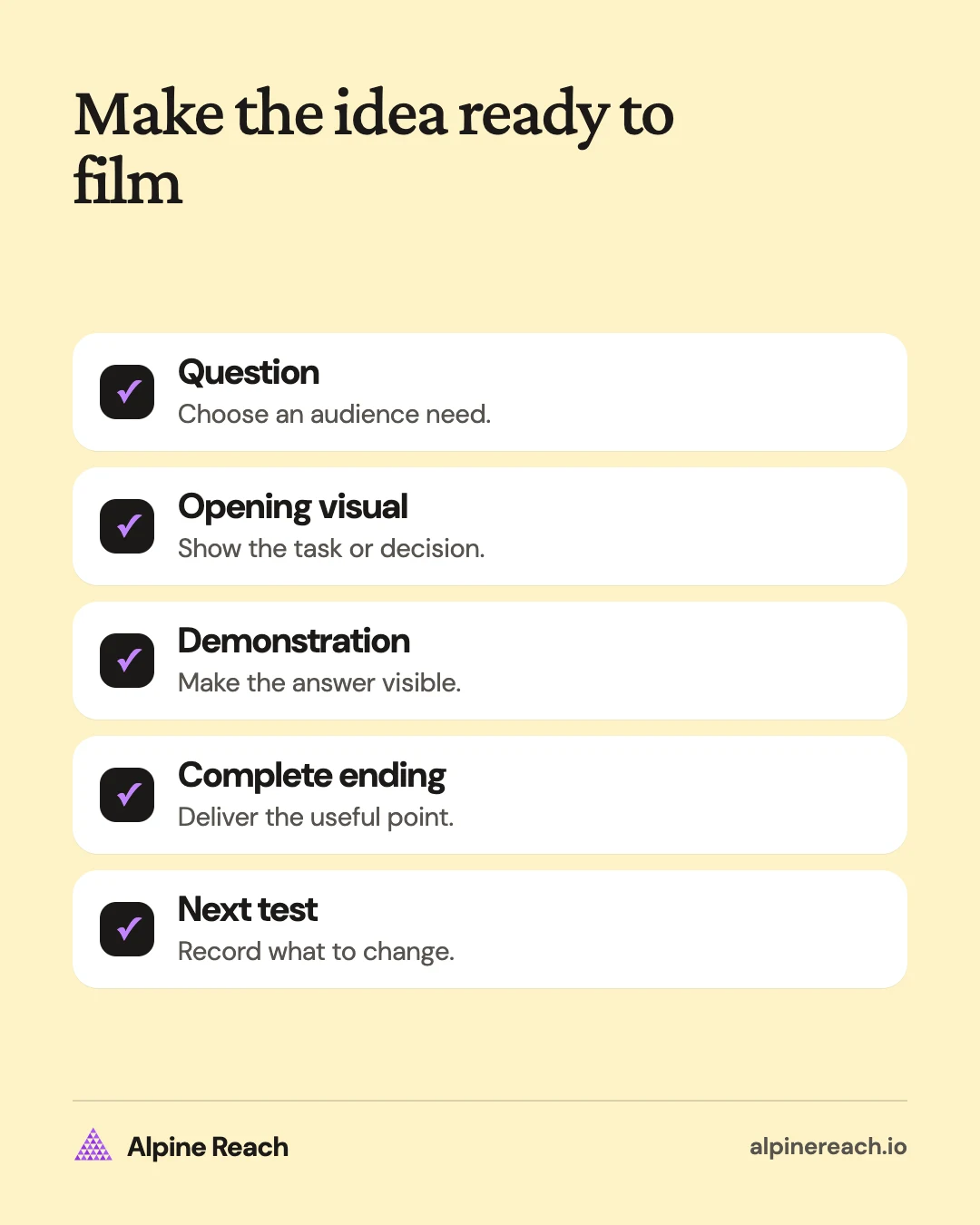
Pair the question with something you can show. “How do I organize files?” is broad. “Where should the approved logo files go in a project folder?” gives a designer a visible task to demonstrate.
For each idea, write the question, the opening visual, the useful demonstration, and the ending. If you cannot describe the demonstration, the idea may still need research.
The examples below are made-up prompts for creators, freelancers, and small businesses.
Tutorials: teach a contained task
A tutorial should leave viewers with a complete answer they can understand without another episode. Start close to the relevant action and remove the introduction that does not help them follow it.
- Show a setting. A design freelancer records how they label layers in a sample project, using invented file names and no private work.
- Demonstrate a choice. A coffee-shop account lays out its own menu cards and explains which information helps someone choose an iced drink.
- Explain a term. A photography creator shows a contact sheet and explains what that term means in their workflow.
- Walk through a checklist. A craft seller shows what they check on a sample order before packing it.
TikTok's Creative Codes guide for advertisers recommends a hook, body, and close, along with vertical footage and attention to interface-safe placement.2 You can borrow that structure as a drafting aid for an organic tutorial without treating advertising guidance as a prediction of organic results.
For the layer-labeling example, open with “Which layer contains the final logo?” Show the confusing sample, demonstrate the change, and end with the organized file. That is enough material for a complete tutorial.
Behind the scenes: explain a decision in the work
A process video needs a reason for the viewer to care about the task. Choose a moment where you can explain why you do something, not just show movement.
- Preparation: A pottery maker films the workbench setup and explains how they arrange the tools for the task ahead.
- Revision: An illustrator shows a self-initiated sketch and explains why they changed the composition.
- Handoff: A web freelancer opens a sample delivery folder and shows where a project owner would find instructions.
Use a short shot list: the starting state, the important action, and the finished state. Add narration that connects them. A viewer should understand what changed even if they have never seen your work before.
Keep customer names, order labels, account details, and private screens out of the footage. Use a sample when the real task cannot be shown safely or clearly.
Recurring episodes: keep the premise and change the question
A recurring format gives you a stable way to present fresh material. Give each episode a complete answer, so someone can start with whichever post they find.
- A term explained: A freelance designer explains a different handoff term in each episode, using their own demonstration file.
- A choice explained: A home-organization creator shows why they would choose a particular container for a clearly described storage problem.
- An object explained: A stationery shop demonstrates how a different item fits into an everyday desk routine.
Keep a consistent promise in the title, such as “Design handoff questions.” Change the specific question in each post. Avoid withholding the answer merely to direct someone to the next episode.
Here, a recurring series means an editorial format you publish repeatedly. It does not refer to a paid feature or require a playlist. Use the content pillar examples if you need a subject broad enough to sustain different episodes.
Duets and Stitches: contribute an explanation
TikTok's Duet feature plays your video alongside another creator's video, and not every video has Duet enabled.3 Choose it when a simultaneous visual comparison helps make the point.
- Follow a demonstration: An illustrator uses an enabled Duet to try a drawing exercise beside the original creator, then explains their own choices.
- Show another approach: A craft creator demonstrates an alternative technique beside an enabled source video and describes the different use case.
TikTok's Stitch feature lets you combine part of another video with your own, and not every video has Stitch enabled.4 Choose it when the original excerpt supplies context for an explanation that follows.
- Answer an open question: A designer uses an enabled Stitch to respond to a question about preparing a brief, then shows an invented example.
- Add a missing condition: A photography creator responds to an enabled clip about equipment by explaining the conditions of their own demonstration.
Use the available in-app feature and keep the source's meaning intact. If the feature is unavailable, make a standalone explanation with your own materials. Your contribution should add a useful answer rather than repeat the original clip.
Adapt trends and try faceless ideas
Treat a trend as a possible presentation style. Keep your own subject and example, and skip a trend when you cannot connect it to something your audience needs.
Try these adaptations:
- Expectation and process: A freelance designer contrasts an empty canvas with the notes they need before starting, using original footage and narration.
- Reveal: A craft seller shows the raw materials before revealing their own finished sample and explaining a design decision.
- Point of view: A small-shop owner reenacts a common ordering misunderstanding, then explains how to avoid it.
You can also choose a faceless format, meaning a video that does not show your face:
- Hands-only demonstration: Assemble an example stationery bundle on a tabletop.
- Screen recording: Organize a sample project folder with invented data.
- Annotated drawing: Sketch a layout choice and explain the tradeoff in a voiceover.
- Object sequence: Show the tools for a task in the order you use them, with an explanation of each role.
- Photo carousel: Post a step-by-step checklist as a photo post. TikTok's help page says you can add up to 35 photos to one post.5
- Text post: Answer one question in a text post, which TikTok offers as its own post type next to video and photo.5
These are production choices, not separate performance categories. Make the relevant action visible and the explanation understandable. Use footage, recordings, and audio you have permission to use.
Choose the length and test the idea
TikTok's October 2025 announcement describes Smart Split, a TikTok Studio Web tool, accepting source content over one minute long and letting creators choose a length for the resulting clips.6 That is a clipping-tool input condition and editing option, not a universal ideal runtime for an organic post.
For your own video, keep the time needed to answer the question. A visual reveal may need little explanation; a tutorial may need enough room to show the steps and the result. Check the available options in the composer before filming around a particular duration.
Use a simple test plan:
- Pick the question and outcome. Decide whether you want useful follow-up questions, evidence of understanding, or relevant inquiries.
- Record a complete version. Keep the demonstration and remove repeated setup.
- Change a meaningful element next time. Try a clearer opening or a different level of explanation while keeping the subject comparable.
- Review comparable posts at similar ages. Use the same metric and note differences in length, subject, and production.
- Choose the follow-up from the response. Explain what remained confusing or try the same format on a related question.
Watch time is time spent watching, and completion describes whether viewers reached the end. Where your analytics provides those measures, consider them alongside the goal of the post. A longer watch does not by itself prove that someone understood the lesson or wants your service.
Keep an idea if you can make it clearly and it produces evidence relevant to your goal. Use the broader content-ideas system to maintain the question list, and the repurposing workflow to adapt a useful explanation into another format.
FAQ
What is a good first TikTok if I do not have followers?
Show a task you can explain clearly with material you already have. Give it a specific title, demonstrate the useful part, and invite a question you can answer in a follow-up.
Can I build a recurring format without appearing on camera?
Yes. Use your own hands-on demonstrations, screen recordings, drawings, or narrated footage. Keep the question and style recognizable while each episode answers something new.
Should I follow a trend that has nothing to do with my niche?
Skip it if you cannot explain why your audience would care. You can adapt a presentation style while keeping your own subject, example, and message.
General information. Platform features, limits and benchmarks change: check the cited page before you rely on a number.
References
- TikTok. Get inspired with Creator Search Insights. 2024. View source (accessed Nov 10, 2026).
- TikTok for Business. Creative Codes: 6 principles for creating on TikTok. n.d. View source (accessed Nov 10, 2026).
- TikTok. Duets. n.d. View source (accessed Nov 10, 2026).
- TikTok. Stitch. n.d. View source (accessed Nov 10, 2026).
- TikTok. How to post a video on TikTok. n.d. View source (accessed Nov 10, 2026).
- TikTok. New AI-powered tools to make it easier to create and share on TikTok. 2025. View source (accessed Nov 10, 2026).