In short
- Try a work update, a focused question, a useful link, or a short photo sequence.
- Use the suggested materials and time budgets to choose an idea you can make alongside your work.
- Keep useful introductions, portfolio links, and current pickup information in Highlights.
- Try the weekday routine, then choose one Story idea to repeat next week.
In this article
If you are deciding what to post on Instagram Story, try a work update, a focused question, a useful link, or a short photo sequence. The ideas below give you materials, a suggested time budget, and an account type for each, so you can make a Story alongside work you already do.
These accounts and sample lines are made-up examples. The time budgets cover assembling the Story from the listed materials, not completing the underlying work. Use your own photos and samples, and leave private messages, customer details, and unpublished client work out. For feed subjects and format choices, use what to post on Instagram.
Show the work as it happens
Capture a small part of today's work rather than preparing another finished feed post. As of November 2026, Instagram documents adding text to Story photos and videos, so a brief explanation can sit beside what you show.1
- Show today's stopping point. Photograph an unfinished personal drawing and add: “Stopping here until the ink dries.” Needs: your own work, a photo, and text; allow two minutes. Suits: a creator. Show where you paused, without turning the update into a full tutorial.
- Share a work-in-progress checkpoint. A freelance audio editor photographs a self-authored session checklist with one task marked complete. Add: “Dialogue edit finished. Listening check next.” Needs: a sample checklist and text; allow three minutes. Suits: a freelancer. Show the current stage rather than explaining the full editing process.
- Record the day's handoff. A plant shop photographs its pickup shelf before opening, then again when the space is cleared at closing. Describe the change without showing order labels. Needs: photos captured during the day and brief text; allow four minutes to assemble. Suits: a small business.
Ask and listen with a specific prompt
Choose a question whose answer you can use. As of November 2026, Instagram says to tap Stickers while creating a Story, then select a sticker.2 Its documented options include Poll for answer choices, Questions with Text selected for typed responses, and Quiz for multiple-choice answers with correctness feedback.2 Instagram also warns that not every sticker is available to everyone.2
- Invite a title suggestion. Show an untitled personal drawing and use Questions with Text selected: “What would you name this sketch?” Needs: a photo and the Questions sticker; allow three minutes. Suits: a creator. Say that you are collecting suggestions, without promising to use one.
- Choose tomorrow's studio photo. A freelancer asks, “Tomorrow's check-in: microphone setup or desk reset?” with a Poll. Needs: two scenes you can photograph and the Poll sticker; allow two minutes. Suits: a freelancer. Read the votes as preferences from respondents, not as a survey of every customer.
- Try a name-the-plant question. A plant shop photographs a new arrival and asks which plant it is. Use Quiz with names checked against the shop's inventory, then show the label. Needs: a clear photo, verified answer, and Quiz sticker; allow five minutes. Suits: a small business.
Do not ask for sensitive details. If you plan to publish an answer, rewrite the useful question without identifying the person who sent it.
Point to a post, link, product, or service
Give the destination a reason to open. As of November 2026, Instagram documents Share, then Add to story, for eligible feed posts; resharing someone else's post requires their account to be public and their posts to allow resharing, and the feature is not available to everyone.3 A Link sticker lets a viewer open the URL you enter.2
- Introduce a new feed post. Share your new post to your Story if the option is available. Add the detail it answers: “The full post shows how I organize an episode handoff.” Needs: the published post, Add to story, and text; allow two minutes. Suits: a creator or freelancer. Explain what someone will find instead of writing only “New post.”
- Link to the complete sketchbook page. A creator shows a cropped detail and links to the full scan on their own website. Add: “Open the page to see the margin notes.” Needs: a published scan, a detail photo, and a Link sticker; allow three minutes. Suits: a creator. Preview the link and check that it opens the promised page.
- Flag a changed pickup arrangement. A plant shop photographs today's collection sign and links to its current pickup instructions. State the actual date and hours. Needs: a sign photo, confirmed details, and a Link sticker; allow four minutes. Suits: a small business. For a full offer walkthrough, use the Instagram Reels ideas rather than trying to fit it into this update.
Instagram Story ideas for photos
Use photos you already own and can share. As of November 2026, Instagram documents Layout for combining photos into a collage and Add text for writing over a Story photo.1 Choose the arrangement that makes the subject easiest to understand.
- One photo, one status update. Photograph your studio door with its recording sign and say when you will be back at your desk. Needs: one clear photo and text; allow two minutes. Suits: a freelancer. Leave enough uncluttered space for the explanation.
- A photo sequence with a beginning and end. Photograph a shop display before opening, during setup, and when ready. Share the images as successive Stories, each with a short stage label. Needs: photos of the same task and text; allow five minutes after capture. Suits: a small business. Keep the order understandable to someone joining halfway through.
- A before and after with one stated change. Photograph a shop's collection sign before and after replacing yesterday's hours. Label the old view “Previous hours” and make today's date prominent in the updated view. Needs: matching photos and confirmed hours; allow four minutes. Suits: a small business. For a longer explanation of a change, use the Instagram carousel ideas.
- Several details in one frame. Use Layout to combine views of a plant's leaf, pot, and care label.1 Needs: the plant, the built-in Layout feature, and clear detail shots; allow five minutes. Suits: a small business. Keep the grouping focused on the same item rather than filling every space with unrelated photos.
- Text over a quiet photo. Photograph a cleared editing desk and add: “Studio note: no recording sessions tomorrow.” Needs: your own photo and Add text; allow three minutes. Suits: a freelancer. Keep the instruction short and readable against the background.
To stay off camera, keep the photo focused on the object or task.
Keep useful answers in Highlights
Keep Stories that will help a new visitor after today. As of November 2026, Instagram says Stories added to Highlights stay visible there until you remove them, including after the original Story disappears.4 Give each collection a plain subject name.
- Start here. Introduce the subject you cover and what someone can expect from your work. Needs: an introduction photo, short text, and a Highlight; allow five minutes. Suits: a creator. Leave out introductions tied to an expired event.
- Find me here. Keep a Story linking to your current portfolio and contact page. Needs: a portfolio image, checked destination, Link sticker, and a Highlight; allow five minutes. Suits: a freelancer. Update the collection when your contact route changes.
- Pickup. Keep a photo of the collection entrance and a link to current pickup directions together. Needs: current photos, verified directions, Link sticker, and a Highlight; allow five minutes per update. Suits: a small business. Remove expired announcements rather than keeping them beside current instructions.
An announcement can be useful today without belonging in a permanent collection. Before keeping it, ask whether a new visitor could act on it correctly next month.
How Stories work as of November 2026
Instagram's Help Center says Story photos and videos disappear from your profile, Feed, and messages after 24 hours unless you add them as Highlights.5 People allowed to see your Story can also see its Highlights.4
Instagram says to tap Close Friends when sharing to show the Story only to people on that list.6 Decide the audience before publishing, particularly when an update is intended for a smaller group.
Instagram requires a public personal or professional account to view Story insights.7 For View insights steps, past Stories, and metric definitions, use the Instagram Insights guide.
Plan a week of Stories without another production session
Try the weekday routine below as a planning suggestion. Fit it around your actual work, leave room for changes, and skip a slot when you have nothing useful to share. Capture photos during the task so assembling the Story does not require recreating it later.
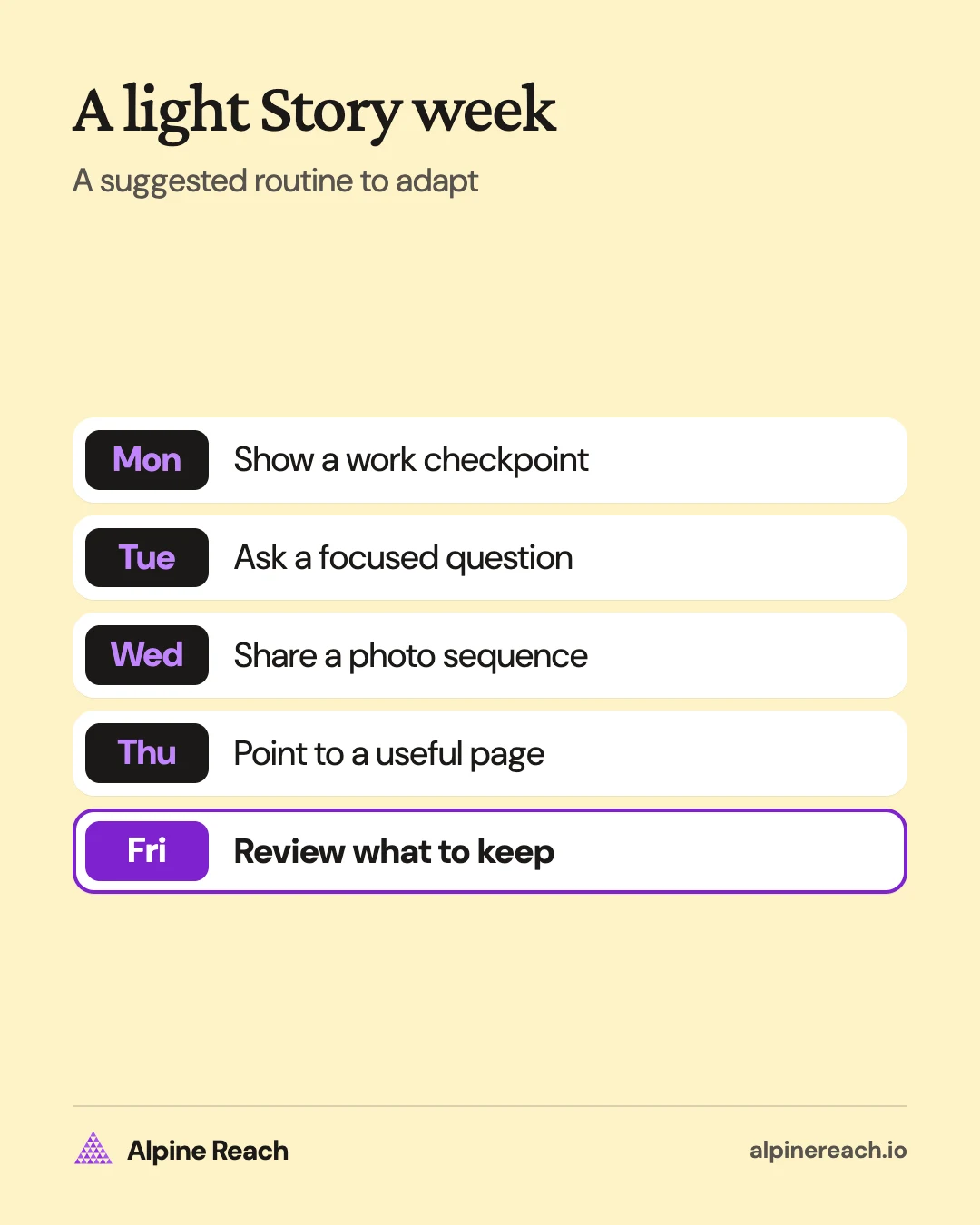
For timing, use the best time to post on Instagram guide to plan a test with your own audience; choose a window when you can also read responses.
For a worked example, take the freelance audio editor described above. During a practice edit, they photograph their checklist and microphone setup. They write the checkpoint as “Dialogue edit finished. Listening check next,” then prepare tomorrow's Poll about which studio photo to show. Both choices use scenes they can capture at their own desk. The portfolio link goes in “Find me here” so the daily update can stay focused on the work in progress.
At the end of the week, review the questions people actually asked and which materials were easiest to capture. Make one decision: choose the Story idea you will repeat next week.
FAQ
What are some fun Instagram Story ideas for a work account?
Try a Poll choosing tomorrow's studio photo or a Quiz asking people to identify a plant from a verified answer. Instagram documents both stickers as of November 2026, but not every sticker is available to everyone.<Ref id="instagram-story-stickers" />
How do you create a photo collage on an Instagram Story?
As of November 2026, Instagram documents choosing Layout in the Story camera to combine photos into a collage. Try related detail shots of the same object.<Ref id="instagram-story-editing" />
What can I post on Stories without showing my face?
Use a photo of your own work, a task sequence, a labeled before and after, or short text over a photo. Start with objects and materials you already have permission to share.
Does the 24-hour rule apply to Story Highlights?
As of November 2026, Instagram says ordinary Stories disappear after 24 hours, while Stories added as Highlights remain visible there until you remove them.<Ref id="instagram-stories" /><Ref id="instagram-story-highlights" />
General information. Platform features, limits and benchmarks change: check the cited page before you rely on a number.
References
- Instagram. Tips for uploading, recording and editing your Instagram story. n.d. View source (accessed Nov 17, 2026).
- Instagram. Using stickers on Instagram. n.d. View source (accessed Nov 17, 2026).
- Instagram. Share someone's post from feed to your Instagram story. n.d. View source (accessed Nov 17, 2026).
- Instagram. Add a story to your Story Highlights. n.d. View source (accessed Nov 17, 2026).
- Instagram. Stories. n.d. View source (accessed Nov 17, 2026).
- Instagram. Share a story with your Close Friends list on Instagram. n.d. View source (accessed Nov 17, 2026).
- Instagram. View insights on your Instagram Stories. n.d. View source (accessed Nov 17, 2026).