

In short
- A carousel can combine photos and videos in one feed post that readers swipe through.
- Public personal and professional accounts can view Instagram Insights.
- Post insights include views, interactions, and profile activity, with saves and shares among the interactions.
In this article
- Teach a process or give readers something to keep
- Correct a mistake or explain a change
- Help someone choose or answer their next question
- Show how you work or tell a story
- Collect resources or explain an offer
- Turn one carousel into a series or a Reel
- Check which carousels worked in Instagram Insights
- FAQ
- References
For Instagram carousel ideas, start with what the reader needs: instructions, a reference to keep, a clearer choice, or an explanation of your offer. These 30 ideas cover ten goals, with a first-slide hook, middle slides, and a last slide for each.
As of November 2026, Instagram lets you combine photos and videos in a single feed post that people swipe through, called a carousel.1 For slide counts, sizes, design, and publishing steps, use how to make an Instagram carousel.
The businesses, scenarios, and hooks below are made-up examples. Adapt them to your own work and accurate details. Use your own text, images, and samples, and keep private or client information out. Link to other people's work rather than reproducing it. If you are still choosing a format, start with what to post on Instagram.
Teach a process or give readers something to keep
Choose a process when the reader needs an order of actions. Choose a checklist when they need a reference to return to while doing the task.
Teach a process step by step
-
Prepare a podcast guest. A freelance producer explains preparation before recording. Hook: “Your guest said yes. What happens next?” Middle: show a sample invitation, topic outline, and recording check, explaining each step. Last: collect the preparation steps into a short handoff note.
-
Assemble a desk shelf. A shop walks through its own product instructions. Hook: “Unboxed your shelf? Start with these parts.” Middle: identify components, show their order, and explain the assembly checks from the actual manual. Last: show the assembled shelf beside the manual's final checks.
-
Plan a product photo session. A photography creator explains their preparation sequence. Hook: “Plan your next product photo before you shoot.” Middle: choose an object you own, sketch the composition, arrange the background, and take a test shot. Last: collect the preparation steps into a reusable shoot plan.
Make a checklist or cheat sheet to save
-
Pack for a pet-sitting visit. A pet sitter shares the information they request. Hook: “Before your sitter arrives, check this list.” Middle: cover access instructions, approved routines, supplies, and emergency contacts without displaying private information. Last: provide a compact checklist someone can save and complete privately.
-
Check a lamp before ordering. A lighting shop provides a purchase checklist. Hook: “Will this lamp work beside your chair?” Middle: show where to check dimensions, outlet position, and the product's listed bulb requirements. Last: gather those checks into a reference card with room for measurements.
-
Prepare an interview note. An independent newsletter writer shares a research cheat sheet. Hook: “Keep this beside your next interview.” Middle: list background checks, open questions, follow-ups, and permission reminders. Last: collect the prompts in one place and invite readers to keep them for their next conversation.
Correct a mistake or explain a change
Use your own samples to show the difference. Explain a specific misunderstanding or revision you can demonstrate, and avoid calling something a common mistake unless you have evidence that it is common.
Put a myth beside a fact or correction
-
Separate editing from rewriting. A freelance book editor explains their service boundaries. Hook: “Does editing mean rewriting every sentence?” Middle: place the assumption beside the editor's actual scope and annotate a self-authored sample. Last: give a question readers can ask an editor before booking.
-
Clarify a digital download. An art-print seller explains what a listing includes. Hook: “Digital print does not mean framed delivery.” Middle: contrast the mistaken expectation with the actual files, delivery method, and printing responsibility. Last: recap what buyers receive and what they arrange themselves.
-
Explain a travel budget assumption. A travel creator unpacks a sample itinerary. Hook: “The ticket price is not the whole trip budget.” Middle: identify the additional categories in the example without inventing prices. Last: give readers a list of costs to verify for their own trip.
Walk through a before and after
-
Revise an appointment email. A virtual assistant explains a self-made sample revision. Hook: “The appointment was buried in this email.” Middle: show the original, mark the competing details, and show the date and action moved forward. Last: recap the editing choices without claiming a response-rate improvement.
-
Develop a board-game insert. A maker documents a storage prototype for their own original game. Hook: “Same game pieces, a different storage plan.” Middle: show the original arrangement, the space problem, and the revised compartments with the same pieces. Last: show the closed box and summarize the design tradeoff.
-
Resequence a photo essay. A photography creator explains an editorial exercise using their own photographs of objects they own. Hook: “Which image should open this story?” Middle: show an initial sequence, explain what feels unclear, and present the reordered photographs. Last: place the opening choices together and ask which better establishes the subject.
Help someone choose or answer their next question
Give readers enough detail to apply the answer to their situation. Keep comparisons balanced, and make the question specific enough to answer completely in one post.
Compare two options
For a one-time versus ongoing offer, compare the commitment, the scope, and the next decision. For the examples below, a one-time offer covers a defined project or purchase; an ongoing offer needs a recurring scope and clear renewal or cancellation terms.
-
One manuscript or ongoing editorial support. A freelance copyeditor compares service arrangements. Hook: “One manuscript or a monthly editing queue?” Middle: compare a defined manuscript project with recurring article support, using the actual scope and terms. Last: ask readers to identify whether their workload is one project or recurring.
-
One bouquet or regular deliveries. A flower shop explains buying options. Hook: “Flowers for one occasion or a regular delivery?” Middle: compare a single order with recurring deliveries, including actual selection and cancellation terms. Last: direct readers to the option that fits the commitment they want.
-
A special episode or weekly coverage. An independent audio creator compares audience offers. Hook: “Want one deep dive or updates each week?” Middle: explain a standalone paid episode and a recurring series, including access and renewal terms. Last: summarize who each option serves and where to read the terms.
Answer a frequent question
-
Explain revision rounds. A freelance animator answers a service question. Hook: “What counts as a revision in this package?” Middle: show a sample request inside the agreed scope, a change outside it, and how approval works. Last: list the questions to settle before work begins.
-
Explain a refill system. A home-fragrance shop answers a product question. Hook: “Can I refill the container I already own?” Middle: show compatible containers and the product's actual refill instructions and exclusions. Last: direct readers to verify their container against the listing before ordering.
-
Explain submission choices. A community newsletter creator answers contributor questions. Hook: “What makes a local event ready to submit?” Middle: show required details, an example submission, and the publication's review process. Last: provide the submission route and actual requirements, without implying acceptance.
Show how you work or tell a story
Choose behind the scenes to explain a decision in your present process. Choose a story to show how a real sequence of decisions unfolded. Use your own materials or work you have permission to share.
Go behind the scenes
-
Show a transcription check. A freelance transcriber explains reviewing an uncertain phrase. Hook: “What happens when the recording is unclear?” Middle: use a self-recorded sample to show listening, marking uncertainty, and requesting clarification. Last: explain how uncertainties appear in the delivered transcript.
-
Explain a batch check. A textile shop shows its own inspection routine. Hook: “What gets checked before a scarf is packed?” Middle: show the actual checks for stitching, labels, and finish. Last: explain what happens to an item needing correction, using the shop's real process.
-
Show a source decision. A science newsletter creator explains research selection. Hook: “Why did this source make the reading list?” Middle: show authorship, methods, limitations, and the detail used in the draft. Last: give readers the source link and the question it leaves open.
Tell a story slide by slide
-
Explain a changed preparation checklist. A freelance translator describes a practice project using their own text. Hook: “The missing file that changed my preparation checklist.” Middle: show the original plan, the missing file, and the revised preparation steps. Last: show the file check added to the checklist.
-
Follow a rejected sample. A puzzle maker tells a development story. Hook: “This piece did not belong in the finished puzzle.” Middle: introduce the sample, show the fit problem, and explain the revised shape. Last: place the versions together and state what the maker learned.
-
Explain a changed tutorial topic. A drawing creator describes a revision to their own lesson. Hook: “I planned a full drawing lesson, then changed the focus.” Middle: show the first outline, the step that needed more explanation, and the revised lesson about that step. Last: show the final outline and ask which part needs another example.
Collect resources or explain an offer
A roundup should help someone find the right starting point. An offer post should help someone judge fit. Give each recommendation or inclusion a reason to be there.
Build a roundup or resource list
-
Collect project-start resources. A freelance researcher curates public reference material. Hook: “Where should you look before writing that brief?” Middle: show verified resources for background, terminology, and source checking, with names and where to find them. Last: recommend which resource to open for each task.
-
Match accessories to a sewing machine. A sewing shop groups its own products by task. Hook: “Which accessory belongs with your next project?” Middle: show each accessory's purpose and verified machine compatibility. Last: collect the compatibility checks readers should complete before purchasing.
-
Collect local reading suggestions. A regional culture creator curates books around a subject. Hook: “Start reading this city's history here.” Middle: name each book, its focus, and why it belongs, using books actually reviewed. Last: offer a starting choice for different interests and ask what to examine next.
Promote an offer without a hard sell
-
Explain a website migration service. A freelance developer helps readers assess scope. Hook: “Moving your site? Here is what this service covers.” Middle: show the actual preparation, migration deliverables, checks, and exclusions. Last: explain how to request a scope assessment and what information to send.
-
Preview a kitchen starter set. A cookware shop explains a bundle. Hook: “What is inside this set, and what will you still need?” Middle: show each included item, its intended use, and any exclusions. Last: direct readers to check the full contents and product requirements before choosing.
-
Introduce a phone photography workshop. A solo creator explains a paid session. Hook: “Bring your phone and an object to photograph.” Middle: describe the actual exercises, materials, accessibility details, and preparation. Last: provide the real date, booking route, and cancellation terms.
Use Instagram caption ideas to add context or scope below the slides. For more subjects across formats, consult social media post ideas for small business.
Turn one carousel into a series or a Reel
Expand the part that needs another answer. The lamp checklist could become a series about measuring a reading corner, choosing from the shop's actual products, and checking setup instructions. Give each post its own complete question so readers can start anywhere.
To make a Reel from that carousel, film the measurement happening and explain what the reader should check. Rewrite the opening for the visible action, then end with the relevant buying check. The Instagram Reels ideas offer more filming approaches.
Keep the source material and permissions with the draft. Choose the next installment from an unanswered question rather than dividing a complete explanation just to make more posts.
Check which carousels worked in Instagram Insights
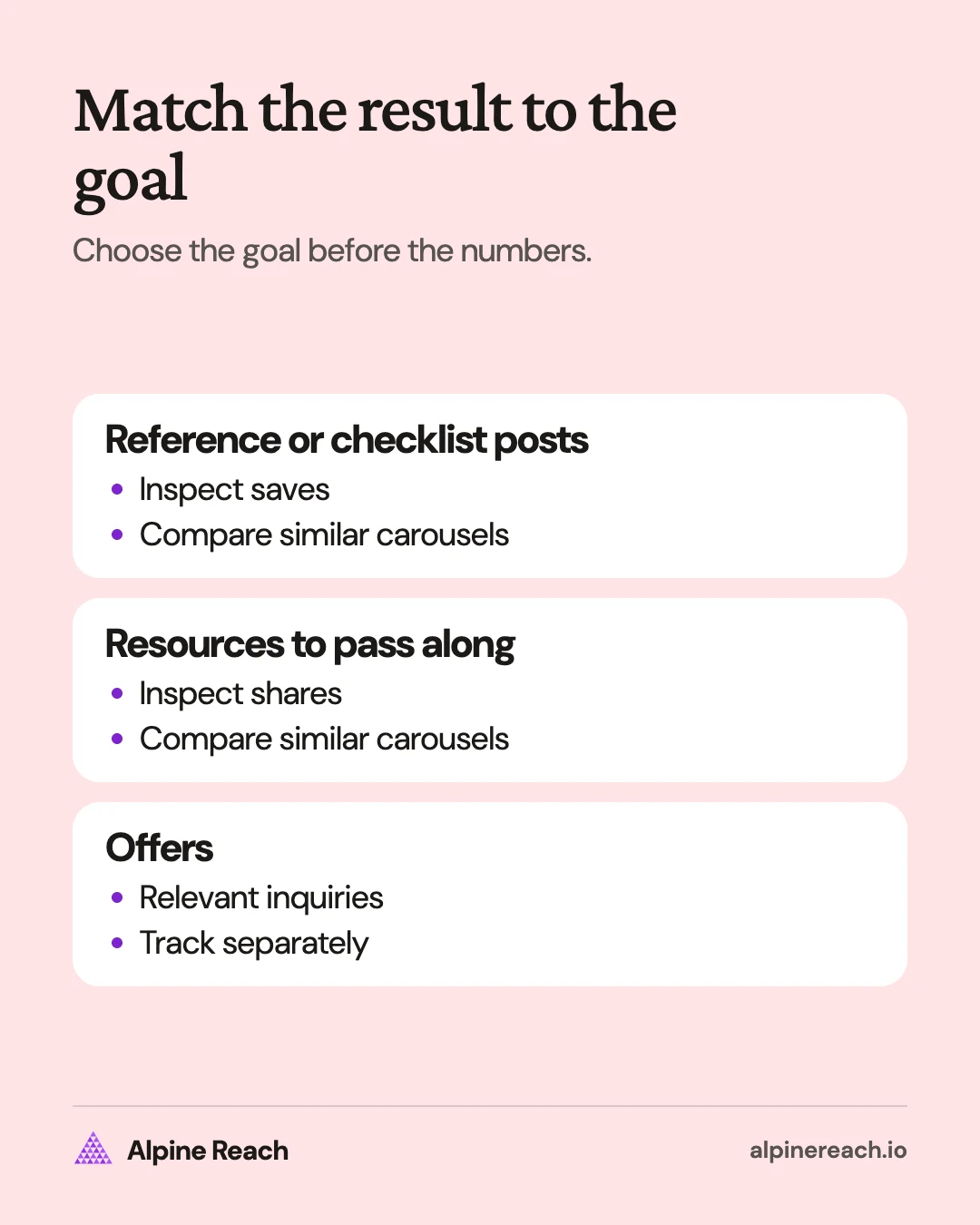
Choose the goal before reviewing the numbers. For a checklist, inspect saves and relevant follow-up questions. For an offer, track inquiries separately and read what people actually ask before treating reactions as purchase interest.
As of November 2026, Instagram requires a public personal or professional account to view Insights.2 To review a carousel in the app, open your profile, select the post, and tap View insights.3 Instagram lists views, interactions, and profile activity for posts; interactions include likes, comments, saves, and shares.3 The Instagram Insights guide explains the account views and metric definitions.
Record the goal, subject, opening, publication date, capture date, and available results. Compare similar carousels after the same elapsed time, marking unavailable metrics as unavailable. Look at saves for reference posts, shares for resources meant to pass along, and relevant inquiries for offers.
Use that comparison to choose a revision: clarify an opening, answer a missing question, or make the buying conditions easier to find. Test timing separately with the best time to post on Instagram guide, keeping the subject and purpose comparable.
FAQ
Can an Instagram carousel include both pictures and video?
Yes. As of November 2026, Instagram allows photos and videos together in a single carousel post.
Do I need a business account to review my carousels?
Instagram currently allows public personal accounts as well as professional accounts to view Insights. The account must be public.
Where can I look for saves and shares on my carousel?
Open the post from your profile and choose View insights. Instagram includes saves and shares among post interactions.
General information. Platform features, limits and benchmarks change: check the cited page before you rely on a number.
References
- Instagram Help Center. Share a post with multiple photos or videos on Instagram. n.d. View source (accessed Nov 12, 2026).
- Instagram Help Center. View account and content insights on Instagram. n.d. View source (accessed Nov 12, 2026).
- Instagram Help Center. View insights on your Instagram posts. n.d. View source (accessed Nov 12, 2026).