

In short
- Name the reader task, useful point, and supporting detail before cutting the warm-up.
- Adapt the hook type to the material you can honestly support.
- Check the visible opening alone, then check that the body fulfills its promise.
- Compare opening styles across similar posts and choose what to repeat from your own results.
In this article
LinkedIn hooks are the opening lines that give someone a reason to read the rest of your post.1 Write yours around the reader's task, what the post delivers, and a detail you can support.
This article focuses on the opening. Once it is clear, use how to write a LinkedIn post to finish the rest.
What is a hook on LinkedIn?
As of November 2026, LinkedIn's hook lesson treats the opening line as the hook and connects it to the reader's decision to click “see more.”1 Aim to help the right reader recognize the subject. Reveal the main point while leaving the explanation for the body.
Check the visible opening on the devices and screens your readers use. Allow for differences in the preview rather than writing to a fixed character or line target.
LinkedIn's writing guide recommends starting with a distinctive perspective or key takeaway.2 “Something changed everything” leaves the subject unstated. Naming the decision, problem, or lesson gives someone a concrete reason to continue.
How to write a LinkedIn hook
Start with the useful material already in your draft. If you are still choosing the subject, pick a question from what to post on LinkedIn before polishing the opening.
- Name the reader. Write a private note: “This is for a freelance illustrator preparing a project estimate.” Keep the role in the hook only when it helps identify the situation.
- Choose the one thing they get. A way to price revisions is specific enough. “Freelancing advice” leaves too much unexplained.
- Find the supporting detail. Use the actual scope clause, decision, observation, or measured result the body explains. Remove a number if you cannot show where it came from.
- Cut the warm-up. Delete “I wanted to share a few thoughts” and start with the task. Keep context when the reader needs it to understand your point.
Try this editable structure: “For [reader handling task], [specific point]. Here is [the example or explanation].” Remove any part that sounds stiff when read aloud.
If you use AI to draft alternatives, the opening-hook drafting prompts cover that step. Supply the facts yourself and check every proposed opening against the finished post.
LinkedIn hook examples by type
These LinkedIn hook templates are fresh drafts to adapt. Replace every [placeholder] with something true and shareable from your own work. First-person lines require your actual experience; the numbers below remain placeholders until you supply evidence.
A specific result or number from your own work
Use this when you have a measured observation and can explain its scope. It becomes clickbait when you hide the baseline, imply causation you did not establish, or suggest everyone will get your result.
- “I logged [hours] editing my own [project]. [Task] took the largest share.”
- “Across [number] estimates I wrote in [period], [scope item] needed the most clarification.”
- “Our team reviewed [number] of our own [assets]. [Specific issue] appeared in [count].”
Include the reporting period and method in the body. A count of drafts is enough material; you do not need a revenue claim.
A mistake or lesson
Use this when a decision taught you something you can explain. It becomes clickbait when the opening promises a serious failure but the body only describes an ordinary preference.
- “I priced [deliverable] without defining [revision boundary]. That left [specific question] unanswered.”
- “I sent [file type] before checking [export setting]. The [specific element] was missing.”
- “We assigned [task] to [role] before checking [dependency]. Here is the handoff rule we use now.”
Keep the lesson proportionate to what happened. Describe your own choice without blaming a person who is absent from the discussion.
A direct question
Use this when the post answers a recognizable work question or explains a real tradeoff. It becomes clickbait when the question is so broad that any answer would fit.
- “Does your [service estimate] explain what happens when [scope change]?”
- “Which part of [production task] can you hand off without another explanation?”
- “Would you delay [launch] or remove [feature] when [dependency] is missing?”
Give your reasoning after the question. Do not make readers supply the entire useful part of the post.
A contrarian but honest claim
Use this when you can challenge a specific recommendation and name the conditions. It becomes clickbait when you invent a popular belief to attack or turn a limited preference into an absolute rule.
- “I would keep [manual step] in [workflow] while [condition] is still unresolved.”
- “For [newsletter topic], I would publish [one worked example] before [a broad tips list].”
- “I would show [unfinished draft] before polishing [visual detail] when I need feedback on [decision].”
Explain what would change your view. A disagreement needs a reason beyond sounding surprising.
A short story opening
Use this when a particular moment leads to a professional point. It becomes clickbait when you prolong the reveal or add drama that the lesson does not justify.
- “I reached [step] in my [practice project] and noticed [specific omission].”
- “While recording [tutorial], I paused at [step]. The [instruction] did not match what was on screen.”
- “At our [internal review], the [brief] asked for [task A], but the [draft] explained [task B].”
Move from the scene to the issue promptly. Keep private details out of the story.
A list promise
Use this when the body contains a bounded set of useful checks or examples. It becomes clickbait when the list repeats the same advice or withholds the promised items behind a reply request.
- “[Number] questions I answer before quoting [service].”
- “[Number] checks for a [deliverable] that another person has to use.”
- “[Number] signs your [process document] leaves the next action unclear.”
Count the finished items before filling the placeholder. Each should add something distinct.
A how-to promise
Use this when you can teach a task with enough detail to try it. It becomes clickbait when the title suggests a complete solution but the body supplies only encouragement.
- “How to turn [interview notes] into a [newsletter outline] without losing [key qualification].”
- “Before you send [deliverable], check [specific detail] this way.”
- “A way to explain [technical concept] to [reader] using [concrete example].”
Match the promise to the instruction you can actually provide. For complete posts around different goals, see LinkedIn post examples.
Check the hook before publishing
Cover the rest of the draft and ask someone to describe what they expect to learn from the opening alone. Write down their answer before explaining your intention, then use the decision below to choose the first edit.
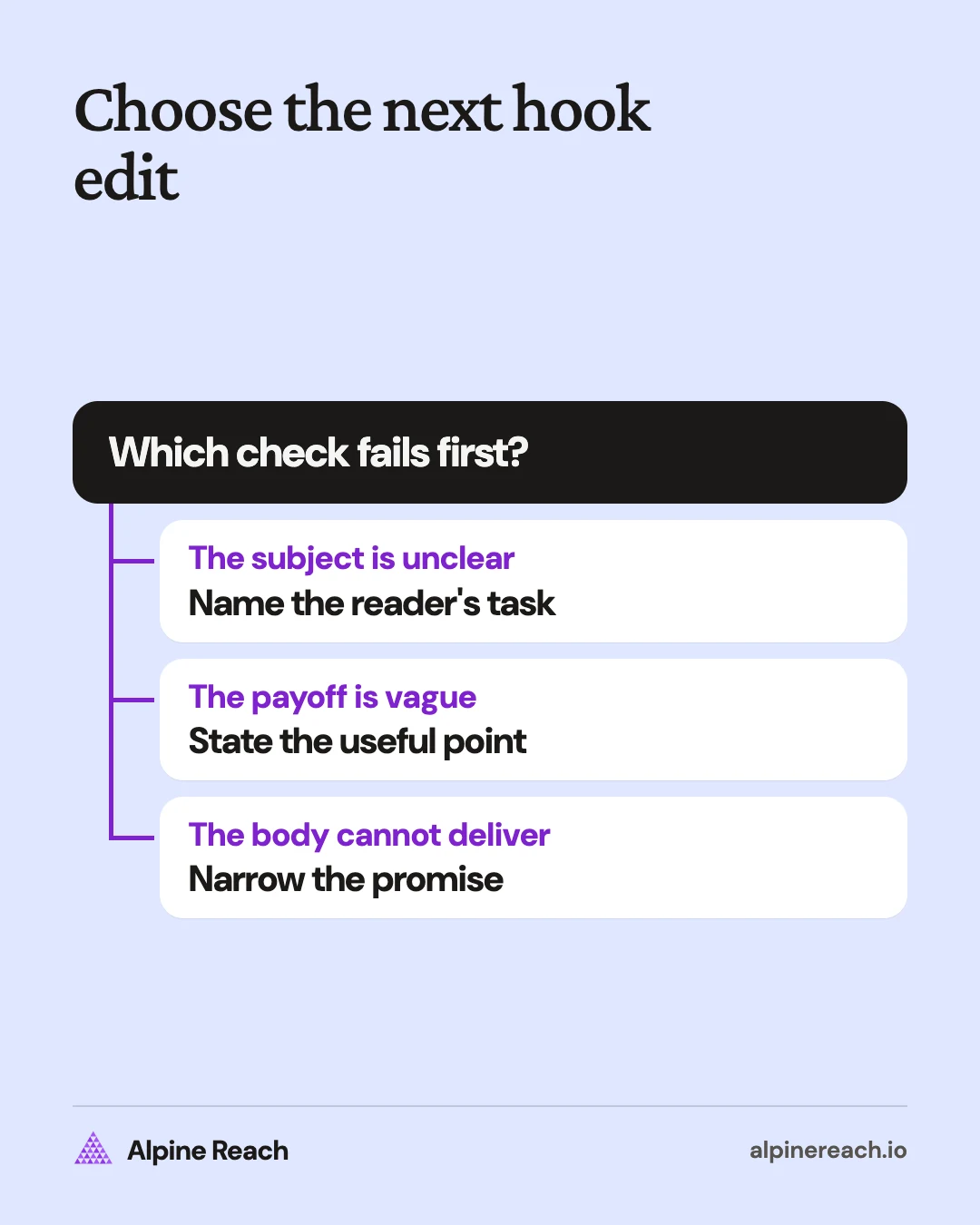
Ask them to mark the exact word that caused confusion. Read your revision aloud: keep wording you would use with a professional peer.
Adapt the hook to the format
Keep the same reader benefit while changing how you introduce it. A spoken opening, cover title, and text-post introduction have different space and pacing needs.
Text post: Let the first sentence identify the useful point. A second can add the condition or supporting detail. Avoid a long introduction before either appears.
Document or carousel cover: As of November 2026, LinkedIn lets you upload a document to a post and add a title to the document.3 Make the cover name the task, then use the accompanying text to add context. For example, a cover could read “Check [deliverable] before handoff,” while the text identifies who will use it. The LinkedIn carousel guide covers file preparation.
Video: LinkedIn's writing guide recommends a strong opening visual or line.2 Say the task before the long introduction. A draft line might be “Watch what happens to [visible detail] when I change [setting].” Show that change in the video.
Comment: Start with the part of the author's point you can extend. “The [detail] raises a question about [specific condition]” introduces a useful response. Use what to comment on a LinkedIn post for the rest of the reply.
Mistakes that weaken the opening
Use these editing checks after the cold read.
- Bait with no payoff: Replace “This changes everything” with the exact change and its limits.
- Vague openers: Replace “Let's talk about success” with the decision your reader faces.
- Hashtags or mentions first: Move them after the useful point unless the named person or topic is essential to understanding it.
- The same pattern every day: Choose the type that suits today's evidence. Do not force every lesson into a dramatic confession or every checklist into an argument.
Test hooks over a few weeks
Use your normal posting rhythm to compare opening styles across similar subjects. The timeline is a suggested four-week plan.
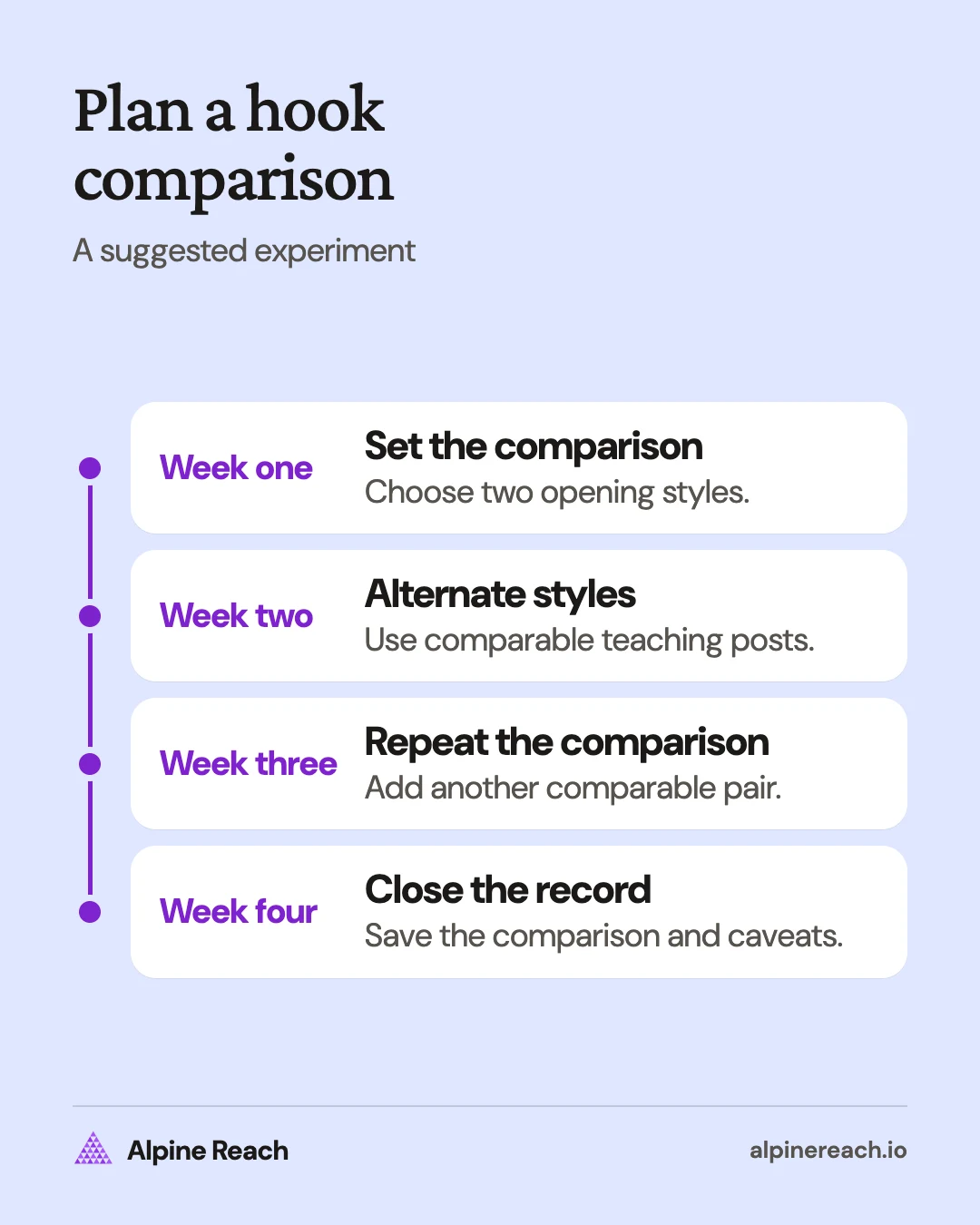
For a personal post, as of November 2026, LinkedIn directs you to click the impressions count in the lower-left corner or View analytics in the lower-right corner.4 Impressions count the times your post was shown on LinkedIn.2 Use the LinkedIn analytics guide for the reporting walkthrough. Record the measures available for your post type; do not label a general click or engagement total as “see more” clicks.
Keep the audience, format, topic scope, approximate body length, and publishing window as steady as practical. Change the opening style as your test variable. Use the LinkedIn posting-time guide to choose a window separately.
For each post, record its link, hook type, topic, publication date, impressions, and comments that address the subject. Read every post after the same elapsed period. Note unusual events or reshares. Inspect whether the responses came from the people you intended to help.
More impressions or comments cannot prove that more people expanded the post, or that the hook caused the difference.
At the end, choose one opening style to use again on a comparable topic, based on repeated results and relevant responses. If neither stands out, keep the one that states your point most clearly and extend the comparison at your usual pace.
FAQ
What should I put in a LinkedIn hook if I have no big result?
Choose a narrow task you can explain, a real question, or a lesson from your own work. A measured achievement is only one possible starting point.
Can I reuse a LinkedIn hook template?
Use the structure when it suits the material, then replace the placeholders with true details. Vary the type when a different opening better represents the post.
How do I tell whether a hook is clickbait?
Read the promise beside the finished post. Narrow it if the body cannot deliver the explanation, evidence, or useful items the opening suggests.
What if my hook test has no clear winner?
Continue comparing similar posts at your usual pace. Until a pattern repeats, use the opening that expresses the point most clearly.
General information. Platform features, limits and benchmarks change: check the cited page before you rely on a number.
References
- LinkedIn Learning. Element 1: Start your LinkedIn posts with a strong hook. n.d. View source (accessed Nov 24, 2026).
- LinkedIn. How to Write an Engaging Post in Your LinkedIn Feed. 2024. View source (accessed Nov 24, 2026).
- LinkedIn Help. Upload and share documents on LinkedIn. n.d. View source (accessed Nov 24, 2026).
- LinkedIn Help. View post analytics for your content. n.d. View source (accessed Nov 24, 2026).