

In short
- Connect one business goal and one reader to recurring themes from work you can explain.
- Start with a workload you can maintain, including preparation, replies, and comments.
- Review comparable posts and verified business actions, then make one decision for the next cycle.
In this article
A content strategy for LinkedIn connects one business goal to one reader, a small set of work-related themes, a publishing rhythm, and a review of what happened. Start with a plan you can run alongside your actual work, then use your own responses and numbers to decide what to repeat.
If you need to choose and coordinate several channels, use how to create a social media strategy. The plan below assumes LinkedIn is already a channel you want to support.
Choose one goal, one reader, and an account
Pick the business outcome your next stretch of posting should support: suitable inquiries, hires, partnerships, or an audience for a launch. Define the response you would count, such as an inquiry about the service you actually offer. Record a starting count from your own records, or mark it unknown.
Make the reader specific enough to recognize in a conversation. Try: “I write for [role] at [kind of organization] who is deciding [work decision].” A creator preparing [resource launch] might write for [kind of practitioner] deciding whether [resource scope] fits their next project. Plan a demonstration using [original material] that helps that reader inspect the fit.
Keep your goal, reader, and themes together as you plan. You can use a free social media strategy template you can copy to Google Sheets or download for Excel.
Choose the account according to whose work the content represents. As of November 2026, LinkedIn describes profiles as representing individuals and Pages as representing organizations. Its Pages help members learn about an organization's business, products and services, and job opportunities.1
For your own professional perspective, plan around your personal profile. For an organization's explanation of its offering or hiring needs, plan around its Page. A small team can support both if each has a distinct purpose and an owner. Start with one if maintaining both would leave neither with time for replies.
Write the response beside the goal: “During [review period], count [defined action] from [intended reader].” This sets a measurement choice, not an expected result. If the wider direction is still unclear, choose a content strategy framework before filling more publishing slots.
Choose themes from the work you can explain
Use three or four recurring themes tied to the decisions your reader faces and the work you can credibly discuss. The content pillars examples cover how to choose those themes; here, use them to assign a subject to each LinkedIn slot.
These are made-up planning examples. Replace every [placeholder] with true details from your own work before using them.
Freelancer: help a buyer understand the engagement
For a freelance translator, use [product team] preparing [a release in another language] as the reader.
- Goal and reader: “Help [product role] understand [translation scope] and invite inquiries about [release requirement].”
- Three themes: “[Terminology choices], [source-text questions], and [release checks].”
- Repeating plan: “Use a text slot for [a terminology choice]. Use a document slot for [a release check the team can inspect]. Rotate the remaining theme into the next week.”
- Review evidence: “Record inquiries that mention [language and release scope] and questions about [source-text requirement].”
Consultant: explain how you approach a problem
For a procurement consultant, use [purchasing manager] preparing [supplier evaluation] as the reader.
- Goal and reader: “Help [purchasing role] assess [supplier requirement] and discuss partnerships around [specialist contribution].”
- Three themes: “[Evaluation criteria], [supplier questions], and [trial design].”
- Repeating plan: “Use a text slot for [a supplier question and its purpose]. Use a video slot for [a walkthrough of an original trial worksheet]. Rotate the next theme into the following week.”
- Review evidence: “Record partnership conversations about [defined contribution] and recurring questions about [decision].”
Small B2B team: help the buyer evaluate fit
For a small workplace-training business, use [learning manager] choosing [workshop for a particular team] as the reader.
- Goal and reader: “Help [learning manager] evaluate [workshop scope] and inquire when [fit condition] applies.”
- Three themes: “[Workshop preparation], [practice design], and [application at work].”
- Repeating plan: “[Subject specialist] supplies the explanation, [editor] prepares the post, and [named owner] checks it and replies.”
- Review evidence: “Record inquiries that describe [team need], plus questions showing confusion about [scope boundary].”
Keep the themes narrow enough to exclude unrelated material. When you need a specific topic inside a theme, use what to post on LinkedIn. Your strategy should make that selection easier.
Build a weekly rhythm around your available time
Start with one post per week, as LinkedIn suggests, and increase toward a cadence that suits you and your connections.2 Move to two posts when the routine holds, keeping 15 minutes of commenting per week and time to prepare, check, and answer your own posts. The suggested week below separates production from participation so you can see whether it fits your working routine.
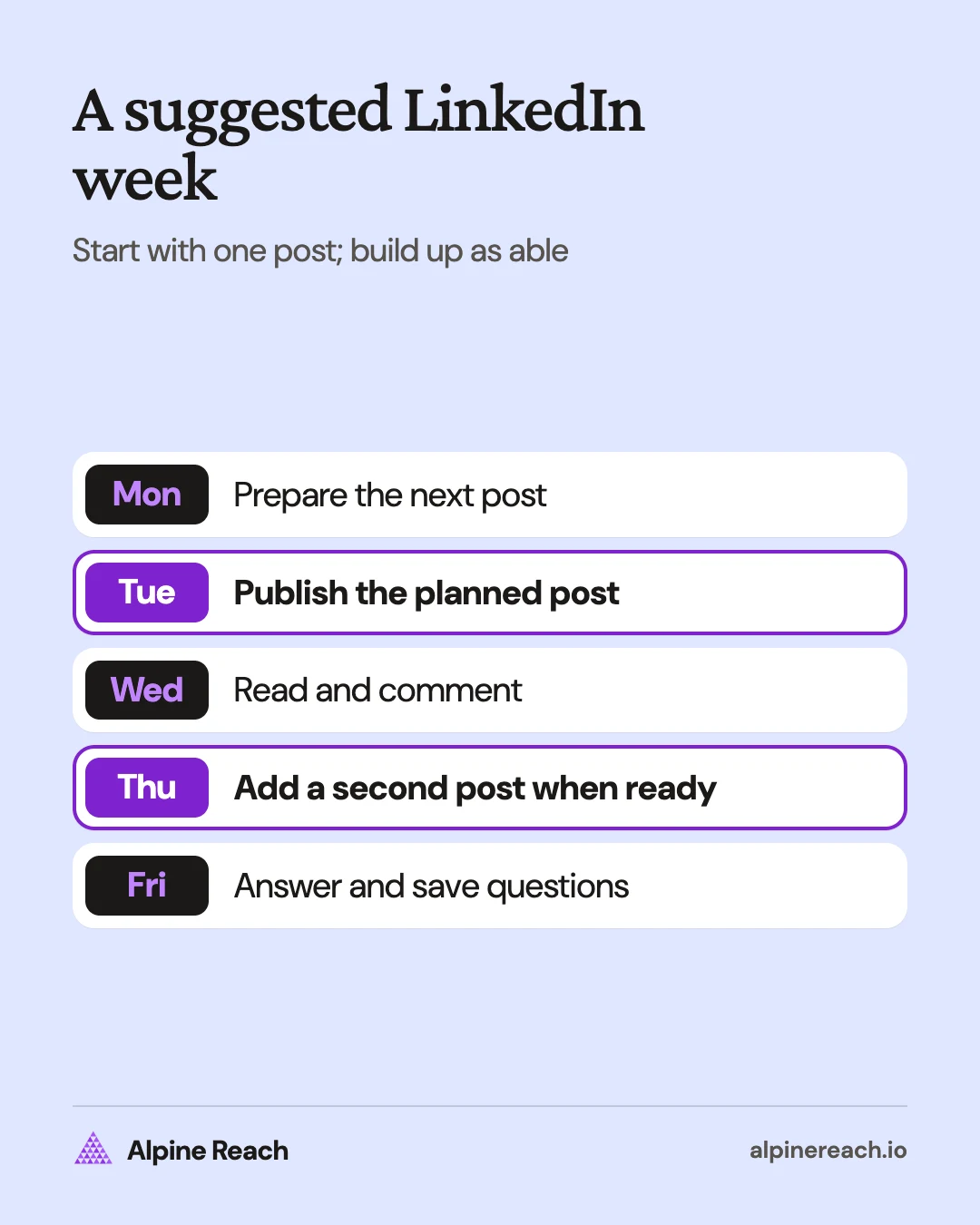
For a sample two-hour weekly budget, allow 75 minutes for drafting and preparing material, 30 minutes for checking, publishing, and answering your posts, and 15 minutes for commenting elsewhere. These are planning allowances. If the material needs more production time, reduce the volume or spread the same plan over two weeks.
As of November 2026, LinkedIn's posting guide lists text, video, articles, and documents among its options.3 Its document help confirms that you can attach a document to a post, including from a LinkedIn Page.4 Choose the format within each theme using the sample plans above.
For document preparation, use the LinkedIn carousel guide. Give a longer article its own preparation allowance before adding it to this routine.
Give each planned post a theme, format, owner, and intended response. Use how to write a LinkedIn post for the draft, LinkedIn hooks for the opening, and LinkedIn post examples when you need to inspect a complete structure.
Choose publishing windows separately with the LinkedIn posting-time guide. Keep those windows reasonably stable while you assess the themes. The sample workload here is a starting choice you can maintain or revise.
Make your profile and comments part of the plan
Before the first planned post, read your profile as the person you intend to help. As of November 2026, LinkedIn documents a headline, current position, contact information, and Experience section; its About section lets you express your mission, motivation, and skills.56
Use the headline to name the work you do. Use About to explain whom you help, the work you can support, and how someone can take the next step. Keep Experience accurate and contact information current. Read those fields beside your planned themes: would the same person understand both?
LinkedIn suggests adding media samples for quick access to your work portfolio; choose an original sample that demonstrates one of your planned themes.7
Use what to comment on a LinkedIn post for the commenting routine and response examples. Keep that work inside the participation allowance in your weekly plan. For a team, name who answers a specialist question and who checks an answer before it is posted.
Review your own numbers after four to six weeks
Set the review date before you begin. Four to six weeks is a suggested first checkpoint for this plan; a small set of posts may still leave you with an unanswered question. Compare posts at a similar age and keep the account and reporting period clear.
As of November 2026, LinkedIn provides analytics for individual personal posts and separate reports for Pages.89 Use the LinkedIn analytics guide to choose and interpret the reports for your account.
Compare those reports with the business actions you recorded yourself. Match an inquiry to [post link or subject] only when [the person's message or another record] supports that connection; otherwise mark the origin unknown.
Add the theme and any verified business action to the comparison record described in the posting-time guide. Keep unavailable data marked as unavailable. Group the posts by theme to see which questions deserve another explanation.
Ask what repeated: did the intended people discuss the topic, did they understand the next step, and could you maintain the work? Inspect the individual posts behind a theme before judging its total.
Finish with one decision for the next cycle
After inspecting the posts and responses, use the decision below to settle what belongs in your next plan. Record the evidence behind your choice.
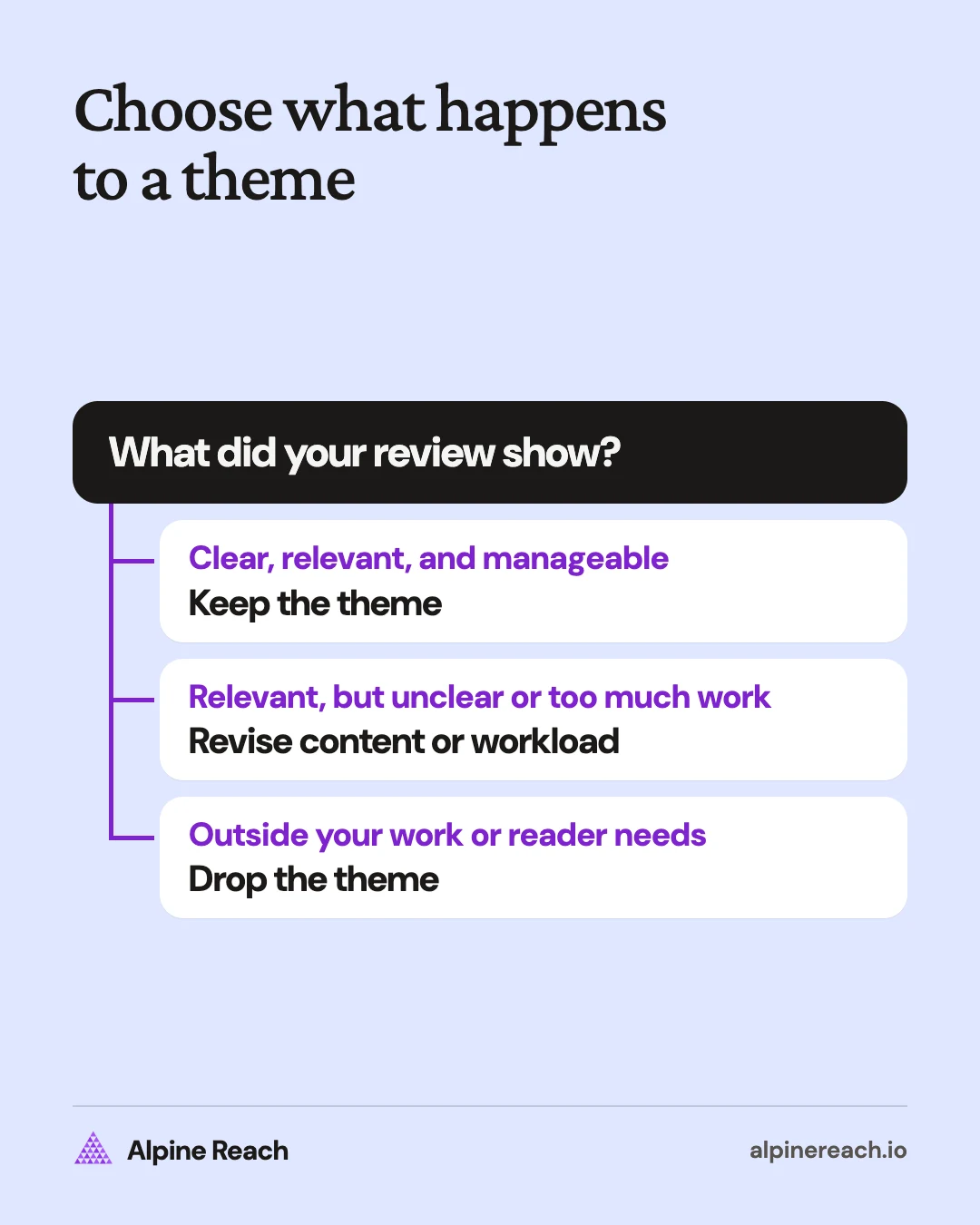
If the evidence is mixed, keep the subject and change one part of its presentation, such as the example or format. Hold the reader and publishing rhythm steady while you inspect that change. If there are too few comparable posts, repeat the comparison at the pace you can support.
Finish this sentence: “For the next cycle, we will [one decision] on [theme], because [observed evidence], and review [measure] on [date].” That is the next action your LinkedIn content plan needs.
FAQ
Can a LinkedIn content strategy work with one post a week?
Use the suggested two-post workload over two weeks if that fits your available time. Reserve time for preparation and participation, then extend the comparison when you have too few comparable posts.
Should my business use a personal profile or a company Page?
As of November 2026, LinkedIn says profiles represent individuals and Pages represent organizations. Choose according to whose work the plan represents, and give each account a distinct purpose if you maintain both.<Ref id="linkedin-profile-page" />
What should a small B2B team record besides LinkedIn numbers?
Record verified business actions that match the goal, questions from the intended reader, and the effort required to prepare and support the posts. Keep those records beside each post so you can inspect the evidence behind a theme.
What if the first review does not show a clear pattern?
Continue at a manageable pace and compare more similar posts. If you revise a useful theme, change one part of its presentation while keeping the reader and rhythm steady.
General information. Platform features, limits and benchmarks change: check the cited page before you rely on a number.
References
- LinkedIn Help. Differences between a LinkedIn profile and a LinkedIn Page. n.d. View source (accessed Nov 25, 2026).
- LinkedIn. How to Write an Engaging Post in Your LinkedIn Feed. 2024. View source (accessed Nov 25, 2026).
- LinkedIn Help. Get started with posting on LinkedIn. n.d. View source (accessed Nov 25, 2026).
- LinkedIn Help. Upload and share documents on LinkedIn. n.d. View source (accessed Nov 25, 2026).
- LinkedIn Help. Your LinkedIn profile. n.d. View source (accessed Nov 25, 2026).
- LinkedIn Help. Edit the About section on your profile. n.d. View source (accessed Nov 25, 2026).
- LinkedIn Help. Create a good LinkedIn profile. n.d. View source (accessed Nov 25, 2026).
- LinkedIn Help. Post analytics for your content. n.d. View source (accessed Nov 25, 2026).
- LinkedIn Help. Access your LinkedIn Page analytics. n.d. View source (accessed Nov 25, 2026).