In short
- Plan the month by subject and format, then finish the next week in small batches.
- Use clear readiness states and a weekly 20 minute check to keep the calendar current.
- Review the results beside each brief and choose one pillar or format change for next month.
In this article
An Instagram content calendar gives each planned post a date, format (single feed post, carousel, Reel or Story), pillar (recurring subject), caption idea, status and space to record how it did. Plan the month at that level, then finish the next week's drafts in small batches. If you also publish on other channels, use the general social media calendar method for the shared setup.
Set up your Instagram calendar
Keep each planned Instagram post in its own row, with the draft and asset easy to find. Mark an intentionally open date differently from an unfinished post.
To start with those fields, use the free content calendar template: copy it to Google Sheets or download it for Excel, with a calendar, pillars and an ideas bank, and no sign-up.1 Keep your Instagram rows together while you work on this month's plan.
For alternative weekly and monthly views, see the content calendar examples. Choose a view you can maintain, then spend your planning time on the posts themselves.
Plan for Instagram's different formats
Give each format a production task and a purpose. As of November 2026, Instagram describes Reels as short videos you can create and edit, and carousels as multiple photos or videos in one feed post that people swipe through.23
Use what to post on Instagram to choose the job for each format. In the calendar, name the material that must be finished:
- Reel: link the script, footage and edited version separately. Use Instagram Reels ideas for subjects.
- Carousel: keep the slide outline and complete slide set with the row. Use Instagram carousel ideas when selecting a subject.
- Single feed post: link the selected image and its caption draft.
- Story: reserve a flexible subject note. Use Instagram Story ideas when a current update is worth sharing.
As of November 2026, Stories disappear from your profile, Feed and messages after 24 hours unless added to Highlights.4 Keep lasting instructions somewhere people can still find them.
Review the proposed covers together as well as individually. Instagram says the first photo or video of a carousel appears on your profile.3 Check whether the next covers make your subjects understandable when viewed as a group. Make each post useful on its own so moving a slot does not require rebuilding its neighbors.
As of November 2026, public accounts can schedule photos, carousel posts and Reels in the app; the documented preparation flow places scheduling under More options.5 Meta Business Suite's desktop Planner shows published content and content scheduled in Business Suite, offers week and month views, and lets you schedule content from an upcoming day.6 Content permissions are required to create and manage organic content.6
Keep the draft deadline in your calendar even when you use those features. Treat the calendar as the record of work and the publishing screen as the place to confirm the saved date and time.
Build the month around work you can finish
Bring three or four existing pillars into this month's rows. Use content pillar examples if you are still choosing subjects, or the one-page social media content plan if the month's purpose and mix are undecided.
Choose a weekly pattern with the Instagram frequency guide, then use the placeholder weeks below to assign specific drafts. Keep later weeks at the subject-and-format stage until you can name the materials they need.
Batch Instagram captions in one session, using Instagram caption ideas when a draft needs structure. Shoot the selected footage or design the slides in a separate session, working from the same rows.
Try an hour as a weekly budget: 20 minutes for the check below, 20 for captions and 20 for shooting or design using materials already available. This is a time limit to plan around. Original filming or detailed editing may need longer, so simplify the post or reduce the planned workload when the work will not fit.
Adapt a worked example week
The freelancer and small shop below are made-up examples. Each uses one Reel, one carousel and a few Stories as an illustrative workload, with placeholder topics and no recommended posting times. Replace the brackets with your own details.
Freelancer
Mon, Reel: pillar [your process]; question [what someone needs to understand]; footage [your own sample]; caption opening [the point of the demonstration]; status [drafting]. Finish the script and collect the sample before the filming session.
Wed, carousel: pillar [preparing to work together]; topic [one question from your ideas bank]; slides [the explanation in order]; caption note [context the slides need]; status [idea]. Outline it during writing time, then design it in the production session.
Tue, Thu and Sat, Stories: reserve [a current work checkpoint or useful follow-up], subject to something worth sharing. Record what you actually published rather than inventing an update to satisfy the placeholders.
Small shop
Mon, Reel: pillar [using your products]; topic [one verified task]; footage [the item and materials already available]; caption opening [what the viewer will learn]; status [drafting]. Check that the demonstration matches the item's actual instructions.
Wed, carousel: pillar [choosing an item]; topic [a real buying question]; slides [details checked against your current stock]; caption note [any essential scope]; status [idea]. Confirm the facts before finishing the design.
Tue, Thu and Sat, Stories: reserve [today's relevant shop update], with [the date and any details to recheck]. Skip the placeholder when nothing useful is ready.
Before using either example, replace Mon and Wed with your own dates and add a chosen time and time zone. Follow the Instagram posting-time guide to test timing separately from the content plan.
Keep posts moving through clear statuses
Give every row a status that tells you what still needs doing. Use the sequence below as your working definitions, and update the row when the underlying work changes.
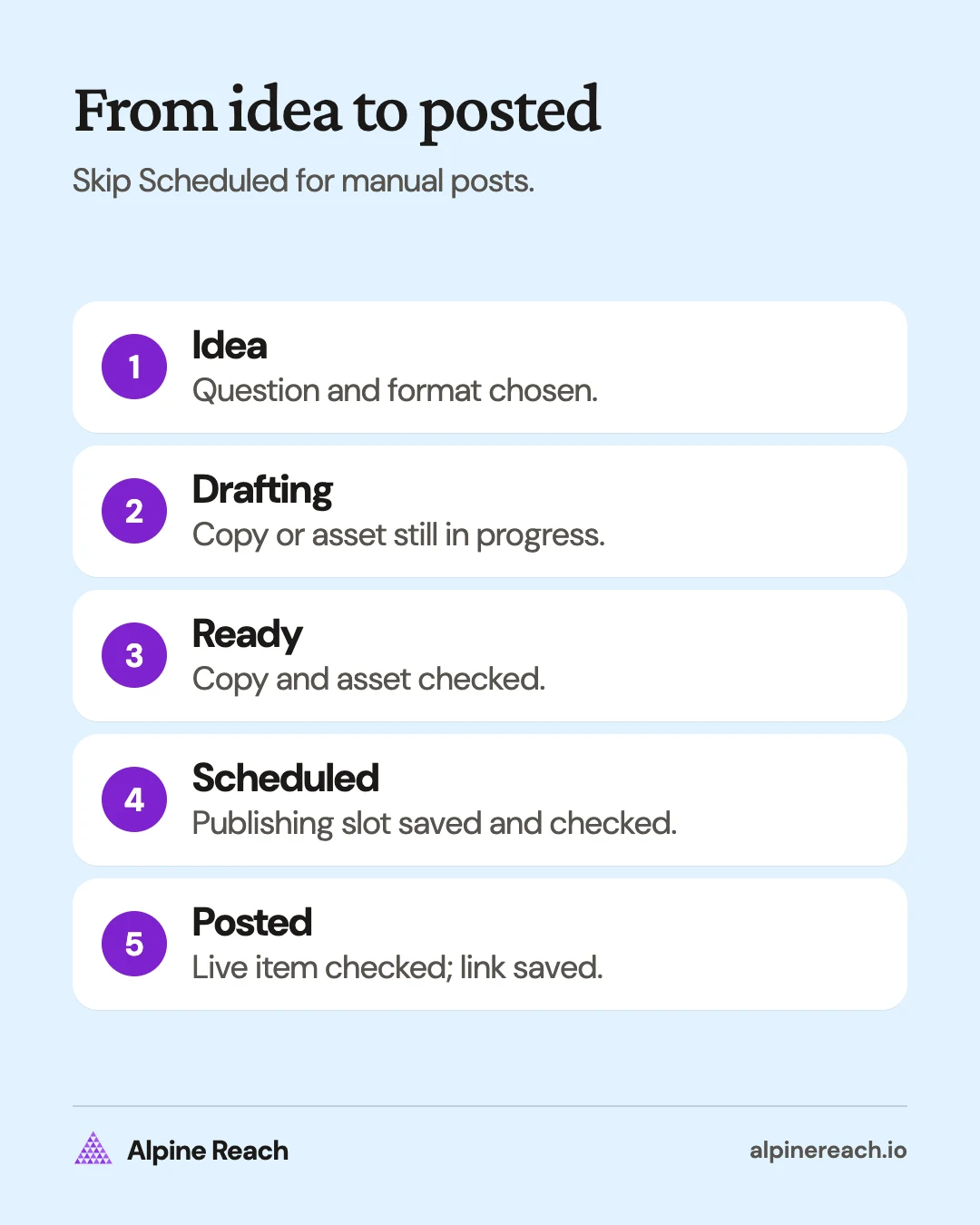
Suppose the freelancer's carousel still needs its final slide. Keep it in drafting and write that missing task beside the draft. When the complete copy and asset have been checked, move it forward. A date in the calendar alone is not a reason to advance its status.
Keep the original brief when a post moves, and add the reason for its new date.
Use a weekly 20 minute check
Put a recurring 20 minute appointment beside the production sessions. Use it to check what published, clear the next week's missing tasks and decide whether an empty slot needs action.
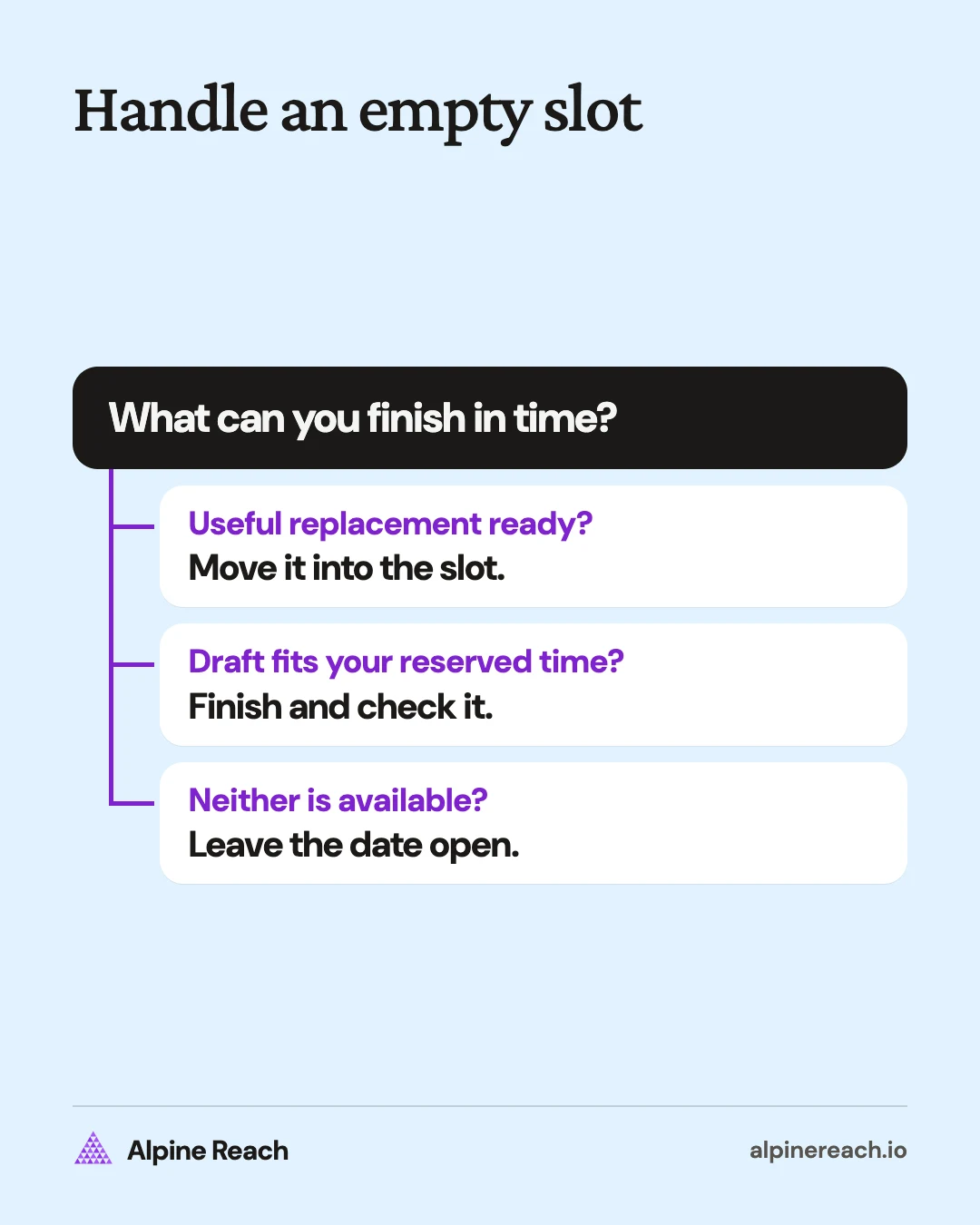
Spend the first five minutes opening the posts you expected to publish and updating their links and statuses. Use the next five to check deadlines and missing assets. Spend the remaining ten choosing the next week's briefs and naming the task that will move each one forward.
Put the chosen action beside the open date, with a deadline if more work is needed. If gaps keep recurring, reduce the workload or bring preparation forward during the next batch.
For a flexible Story, capture material while doing the underlying work. Decide that day whether the update is useful enough to publish.
Review the month and change one thing
Use your own results to choose what to keep, change or drop. As of November 2026, Instagram documents insights for individual posts, Stories and Reels, including views and interactions such as saves and shares.7 Use the Instagram Insights guide to find those numbers and understand their labels.
Use that guide for metric definitions and comparable measurements. In this calendar, put the result and its capture date beside the original brief so you can review the content decision and production work together.
Mark each pillar or format keep, change or drop. Keep what remains useful and manageable; change the production task when drafts stall; drop work that no longer serves the audience or fits your capacity.
Make one decision: write down the single pillar or format change you will test next month, what you will keep steady and which result will help you judge it.
FAQ
Which Instagram accounts and formats support in-app scheduling?
As of November 2026, public accounts can use in-app scheduling for photos, carousel posts and Reels, with scheduling under More options.<Ref id="instagram-scheduling" />
Does planning a month mean finishing every caption now?
No. Give the month a direction and assign subjects and formats, then finish the next week in batches. Keep later slots flexible until their drafts and materials are ready.
Can I maintain this calendar in an hour a week?
Try the suggested budget of 20 minutes for checking, 20 for captions and 20 for production with existing materials. Original filming or detailed editing may take longer. Simplify the post or reduce the workload when it does not fit.
General information. Platform features, limits and benchmarks change: check the cited page before you rely on a number.
References
- Alpine Reach. Free Content Calendar Template (Google Sheets and Excel). n.d. View source (accessed Nov 26, 2026).
- Instagram Help Center. Reels. n.d. View source (accessed Nov 26, 2026).
- Instagram Help Center. Share a post with multiple photos or videos on Instagram. n.d. View source (accessed Nov 26, 2026).
- Instagram Help Center. Stories. n.d. View source (accessed Nov 26, 2026).
- Instagram Help Center. How to create and manage scheduled posts and Reels on Instagram. n.d. View source (accessed Nov 26, 2026).
- Meta Business Help Center. Use Planner in Meta Business Suite on desktop. n.d. View source (accessed Nov 26, 2026).
- Instagram Help Center. About Instagram insights. n.d. View source (accessed Nov 26, 2026).